Text messages from OurGym
Which text messages OurGym sends, who they come from, how you switch each one on, and how to stop them.
Updated October 5, 2026
Text messages you get through OurGym come from one of two senders, and which one it is decides who you talk to about them.
- OurGym sends you sign-in passcodes and, if you switch them on, replies from the OurGym assistant and alerts about sign-ins to your account.
- Your gym sends you messages about your membership: class bookings, waitlists, schedule changes and payments.
Those are separate programs, registered separately with the mobile carriers, on separate phone numbers. This page covers the ones OurGym sends. For anything your gym sends, talk to your gym.
Message frequency varies. Message and data rates may apply. Reply STOP to cancel, HELP for help.
The three kinds OurGym sends
1. Sign-in passcodes. A one-time code to verify it is you. You get one only when you ask for one, by choosing the mobile-number option at sign-in and tapping Send code (or when you add a number to your account, below). There is no box to tick and nothing to switch on: asking for the code is the consent, and you give it each time.
2. Replies from the OurGym assistant. Text the assistant a question and get the answer back as a text. For gym owners and staff.
Answers are written for a phone: plain text, with a list (a day’s workout, a class roster) one item per line. A reply runs to at most about 600 characters. When the full answer is longer, the text ends with ”…” and the link to the whole answer in the app.
When you switch it on we text you once to confirm, so the number is already in your phone before the assistant needs to reach you. That is the only message the assistant ever sends on its own. Everything after it is a reply to something you sent.
3. Sign-in security alerts. A notice that your own OurGym account was signed in on a device you have not used before, so you can act if it was not you. Also for gym owners and staff.
Where you switch them on
Both live on your own account, under Notifications, in the OurGym staff app. Nobody can switch them on for you, and each is off until you turn it on. Each one names the confirmed mobile number it texts, so you confirm a number first (below) and then switch on whichever you want.
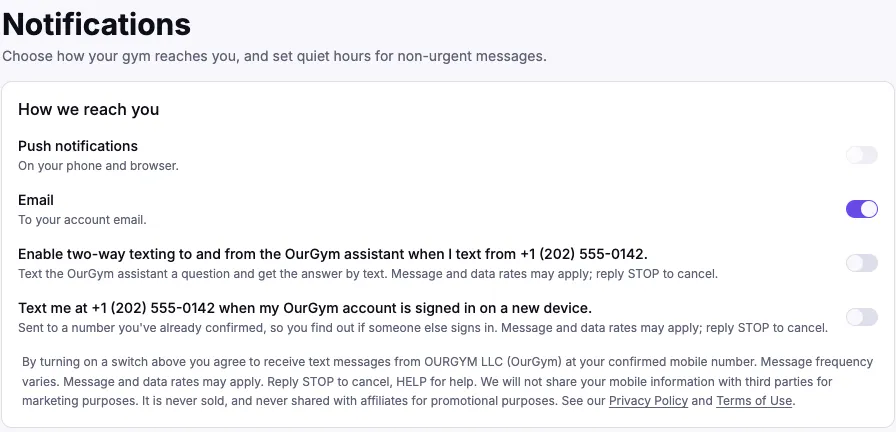
They are two separate switches, on purpose. The assistant is a convenience you start yourself; a sign-in alert arrives without you asking and is a security control. Wanting one should never oblige you to take the other, so you can have either without the other, and switch either off again on the same page.
Both send only to a mobile number you have already confirmed by receiving a sign-in passcode at it. Neither can reach a number you never verified.
If you belong to more than one gym
OurGym’s text numbers are shared by every gym, and a text names no gym. So your texts, including questions to the assistant and messages to a gym’s staff, go to one gym only: the one you choose. Your other gyms never see them.
- One gym: nothing to do. Your texts go to it.
- More than one gym: choose which one gets your texts. Staff do it under Personal settings in the staff app; members do it under Settings (the gear at the top of the members app). Both apps remind you until you choose.
- Until you choose, a text you send reaches no gym and the assistant doesn’t answer it. Instead you get one text, at most once a day, with a link to where you choose. Choose, then send your message again.
- If you leave the gym you chose, the choice is cleared. With one gym left, your texts go there; with several, you’re asked to choose again.
- The assistant answers for your chosen gym only. If you chose a gym where you’re a member rather than staff, it tells you so instead of answering for one of your other gyms.
You can change your choice at any time; it applies to the next text you send.
Adding or changing your mobile number
Staff usually sign in by email, so you confirm a number from inside the app: open the menu under your name, choose Personal settings, type your mobile number and tap Send code. We text you a sign-in passcode; type it in and the number is confirmed. If you open Notifications without a confirmed number, the same form is at the top of that page.
- The number is optional. You can use OurGym without one.
- Once confirmed, you can also sign in with it by text.
- If the number is already on a different OurGym account — say, a member account you made at the front desk — you are told so after you enter the code, and offered to combine the two. Combining moves that account’s gyms, bookings, memberships and history onto yours, makes the number a way to sign in to your account, and closes the other account. It can’t be undone.
- Some combinations need a person first, and the offer says which: when the other account is staff at a gym (a staff account never moves by a text code alone, so a phone number can’t be used to take over someone’s role), when it also signs in with its own email, when both accounts are on the same gym’s member list or pay the same gym by card, or when it has OurGym platform access. For any of these, email support@ourgym.app and we’ll combine them for you.
- Changing a confirmed number switches both text-message settings above off. You agreed to them for the old number, so switch them back on for the new one (the assistant then sends its one-time confirmation to the new number).
If you would rather see the settings before you have an account, there is a read-only preview of that page.
What the messages look like
The one-time confirmation, when you switch the assistant on:
OurGym: you’re subscribed to OurGym staff messages. Msg frequency varies. Msg & data rates may apply. Reply HELP for help, STOP to cancel.
A passcode:
OurGym: your sign-in code is 123456. It expires in 10 minutes. Reply STOP to cancel, HELP for help.
An assistant reply, answering a question:
OurGym: 18 booked for tomorrow’s 6am, 2 spots left. More: https://staff.ourgym.app/chat Reply STOP to cancel, HELP for help.
An assistant reply, when it has prepared a change for you:
OurGym: got it. I’ve drafted that change; confirm it in the app: https://staff.ourgym.app/chat Reply STOP to cancel, HELP for help.
When you belong to more than one gym and haven’t chosen one yet:
OurGym: you’re in more than one gym, so we can’t tell which one this text is for. Choose the gym your texts go to at https://staff.ourgym.app/me/settings#sms-gym and send it again. Reply STOP to cancel, HELP for help.
A sign-in alert:
OurGym: new sign-in to your account from Chrome on macOS near Miami, Florida. If this wasn’t you, email support@ourgym.app. Reply STOP to cancel, HELP for help.
Everything shows up in the app too
Every question the assistant answers by text, and its answer, appears in your assistant conversation in the staff app, marked as having come by text. You can start a question on your phone and finish it at a desk, and the link in a reply lands you in the same thread. Short notices that answer nothing, like the one saying it can’t read a photo, are not saved there.
Text only: no photos
The assistant reads the words you text, and nothing else. If a message carries a photo, a screenshot or any other attachment, it doesn’t try to guess what it shows or answer the caption on its own. It replies once to say it can’t read attachments yet, and points you to the app. Send the question as text instead.
The assistant never changes anything from a text
It will answer questions, and it will prepare a change for you. It will not make one. Anything that would alter your gym’s records waits for you to confirm it, signed in, in the app: the reply carries a link to exactly that.
This is deliberate. A text message arrives from a phone number, and a phone number is not proof of who is holding the phone. Reading your own gym’s numbers that way is a reasonable trade; changing them is not.
The sign-in alert carries no link at all, for a related reason. A link inside a message about someone signing into your account is what a phishing text looks like, and we would rather not teach you to tap one. It names the browser and operating system, and the approximate city the sign-in came from (worked out from its internet address, which is never in the text itself).
What counts as a new device. Each time you sign in, OurGym remembers that browser or app with a cookie. A sign-in from anywhere that cookie is missing is a new device, so you will also get an alert after signing in from a private window, a different browser, or a browser whose cookies you cleared. The very first sign-in on an account never sends one: there is nothing yet to compare it with.
Stopping them
Reply STOP to any OurGym message. You get one final message confirming it, and that number sends you nothing further. Reply START to turn them back on.
Two things worth knowing:
- STOP applies to the number you replied to. Passcodes and staff messages come from different numbers, so stopping one leaves the other running.
- You can also switch them off individually on your Notifications page, which is how you keep the sign-in alerts while turning the assistant off, or the reverse.
After opting out of passcodes you can still sign in: choose the email option and we will email your code instead.
Which numbers can get a sign-in code by text
Sign-in codes are texted to US and Canadian mobile numbers only. If your number is from another country, the sign-in screen says so: choose the email option and we will email your code instead. Members of gyms outside the US and Canada sign in by email today.
To protect you from someone flooding your phone or inbox with codes, we send up to five codes an hour to one number or email address. One internet connection can also only ask for so many codes an hour (20 by text and 40 by email), which a gym’s shared guest Wi-Fi can reach on a busy sign-up night. If the sign-in screen says you’ve reached a limit, wait a few minutes and try again, use a code you’ve already been sent, or sign in with the other option. When text sign-in is busy or unavailable, email sign-in still works.
Text messages are never required
Every OurGym sign-in screen accepts an email address instead of a mobile number, so you can create an account, sign in, and use the whole product without ever giving us a phone number or receiving a text. Agreeing to text messages is not a condition of joining a gym, buying a membership, or purchasing anything else.
No marketing, and nothing shared
OurGym does not send marketing or promotional text messages, and does not text you on behalf of anyone other than your own gym.
No mobile information will be sold or shared with third parties or affiliates for promotional or marketing purposes. Your phone number and your text-message opt-in are used only to deliver the messages described on this page, and are never sold or shared with anyone else, for any purpose.
Where to go next
- Onboarding staff and staff roles: the account these settings belong to
- Privacy Policy and Terms of Use: the full program terms
- Questions: support@ourgym.app
Something here out of date, or a step that didn't work? Tell us at support@ourgym.app.